Applications to do in seconds what takes hours of work in Excel today
Automate your team's repetitive tasks. Zero formulas, zero errors, no prompts.
- ✓ Merge and compare tables from different sources
- ✓ Export and structure data for analysis
- ✓ Split tables into multiple sheets automatically
- ✓ Fill, clean, and prepare data without errors
If you work in Finance, Accounting, Human Resources, Operations, Auditing or Business Control, chances are you perform tasks like these every day:
- Process large volumes of data from ERP or external files.
- Consolidate information for recurring reports.
- Clean, validate, and structure data without errors.
Watch Data Tools Suite
Try it. You'll get it.
🌍 Multilanguage: EN, ES, PT, DE, FR, IT⚙️ Format: Excel Add-In.
Express Merge & Consolidation
Compare lists, find matches, and combine multiple sheets or forms into a single master table in just 2 clicks.
Formula-Free Data Cleaning
Remove spaces, fix distorted ERP text, unpivot columns, and fill blank cells completely in bulk.
Local Corporate Security
Your financial and payroll data is never uploaded to the cloud. Everything is processed locally on your computer, 100% securely.
💼 What kind of work does Data Tools Suite actually solve?
If you work in Finance, Accounting, HR, Operations, Auditing or Business Control, chances are you perform tasks like these every day:
- Consolidate reports from multiple departments or branches.
- Compare lists to find matches or missing records.
- Clean data exported from ERP systems or external applications.
- Prepare datasets for reporting, auditing or Power BI.
- Split large datasets by customer, salesperson or department.
- Create lookup, SUM or COUNT formulas with multiple criteria.
- Detect and fix errors before delivering reports.
- Automate repetitive Excel tasks.
All these tasks can be done manually...
or completed in seconds with the applications included in Data Tools Suite.
Each Data Tools Suite application is designed to solve a specific Excel task. Below you can explore all the included tools and learn what each one can do for your work.
Full Application Catalog

🔗 Merge and Consolidate Tables
|
  |
- Combine data from two tables based on one or more matching criteria.
- Consolidate standardized forms located on different sheets.
|
- Append data from multiple worksheets into a single master table.
- Create a combined summary of tables located across different sheets.
|
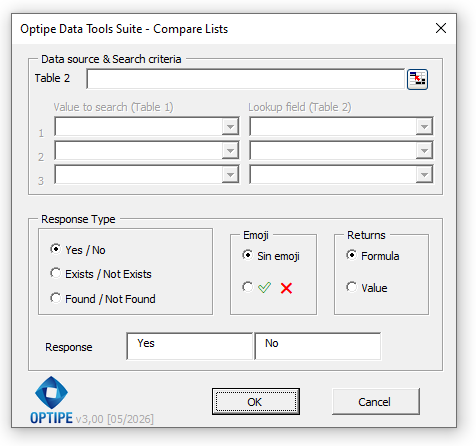
- Compare columns and identify matches or missing data between two tables.
- Generate custom data summaries based on single or multiple criteria.
|
🧹 Clean and Prepare Data
|
  |
|
Remove accents, convert text to numbers, and clean trailing spaces.
Normalize flat data formats to prepare them for Pivot Tables.
|
Fill empty ranges instantly with above values or constants.
|
Manage duplicates, errors, or blank cells in bulk. Select the first occurrence of each value or isolate all repeated rows. Instantly highlight values or formulas that match any specific criteria.
|
🔢 Operations and Calculations
|
  |
|
Perform mathematical calculations in bulk without auxiliary formulas.
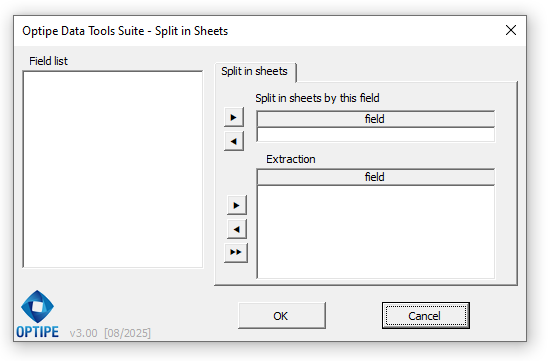
Divide a master table into multiple worksheets by cell value.
|
Use an assisted builder for conditional lookups and sums.
|
Extract structured data from tables using direct search queries.
|
🛠️ Management and Utilities
|
|
Hide, sort, protect, or export worksheets in bulk.
Apply instant visual status alerts based on numeric ranges.
|
 Gather Sheets Gather Sheets
Collects specific worksheets from multiple Excel workbooks into a single file..
 Manage Workbooks Manage Workbooks
Organize, rename, and manage multiple files and folders at once.
|
Audit and delete broken names, hidden objects, and external links.
|
|
Custom format buttons and extra data utilities.
|
Over 30 brand-new built-in calculation functions.
|
18 direct shortcuts for your most frequent actions.
|
Frequently Asked Questions about Data Tools Suite
Are all applications included in the same download? Yes, absolutely. When you install Data Tools Suite, a single menu is added to your Excel ribbon, giving you full access to all applications and over 30 built-in calculation functions. There is no need to pay for or install separate add-ins.
How does the DTS PRO version update? The PRO version includes a seamless, automatic update system. As we optimize processing algorithms or release compatibility updates for new Microsoft Excel versions, your suite will stay up to date without any extra costs.
Is it secure for my company's confidential information? It is 100% secure. Unlike cloud-based platforms, Data Tools Suite runs strictly locally on your computer. No financial, strategic, or HR data ever leaves your spreadsheet or is transmitted over the internet. Your information remains completely protected under your company's internal security protocols.
Does it support large volumes of data without freezing Excel? Yes, it is specifically developed for analysts and auditors who handle thousands of rows. The algorithms optimize Excel's internal memory usage, ensuring that heavy tasks that would normally freeze the application (such as mass duplicate matching or unpivoting massive tables) are resolved smoothly in seconds.
Can I evaluate the suite before purchasing corporate licenses? Absolutely. In fact, purchasing the PRO version is not mandatory. You can download our Freemium version and use all Data Tools Suite applications and features completely free of charge, with no time limits (it includes standard processing limits per task). Whenever your company or workload requires larger scale processing, you can seamlessly upgrade to the PRO version to work without restrictions.
"We purchased licenses for our Controlling team. What used to take half a morning of manual data merging and consolidation is now resolved in minutes. Worth every penny."
— Head of Controlling, Transport Company, Chile
What used to take half a morning now takes 3 minutes.
Same Excel, same team.
Need to roll this out across your team?
This email address is being protected from spambots. You need JavaScript enabled to view it. Licenses for 5 or 10 users →
 Merge Tables
 Consolidate Forms
 Append Tables
 Summarize Multiple Tables
 Summarize a Table
 Clean & Transform Text
 Unpivot Columns
 Fill Empty Cells
 Select and Filter Cells
 Operations on Ranges
 Split into Sheets
 Conditional Formula
 Extract Data
  Manage Worksheets
 Color Markers
 Clean Objects & Names
