
📑 Attach Multiple PDF Files and Documents per Recipient from Excel via Outlook
Need to email multiple invoices, certificates, or statements to the same recipient without drafting separate messages?
Standard Word Mail Merge and basic VBA macros fail when a single recipient requires more than one unique file attachment. With Send Multiple Documents of Optipe MultiMail, you handle one-to-many relationships effortlessly: automatically group all PDF invoices, pay slips, or contracts matching each contact's ID and dispatch them in a single personalized email via desktop Outlook.
Need to send hundreds of personalized documents directly from Excel?
Optipe MultiMail automates personalized email delivery directly from Excel through Outlook. It handles bulk routine tasks in just a few clicks—fast, simple, and without relying on scripts or complex prompts.
It runs entirely on your computer, works with your own Outlook account, and guarantees complete privacy: your corporate data never leaves your machine or travels to third-party clouds.
Important: MultiMail is not an email marketing platform. It is designed for the professional distribution of personalized documents and internal notices in Finance, Human Resources, Operations, Education, and Healthcare.
Video Tutorial: How to Send Multiple Files per Contact from Excel
Step-by-Step Example: Consolidated Invoicing and Supporting Files in One Dispatch
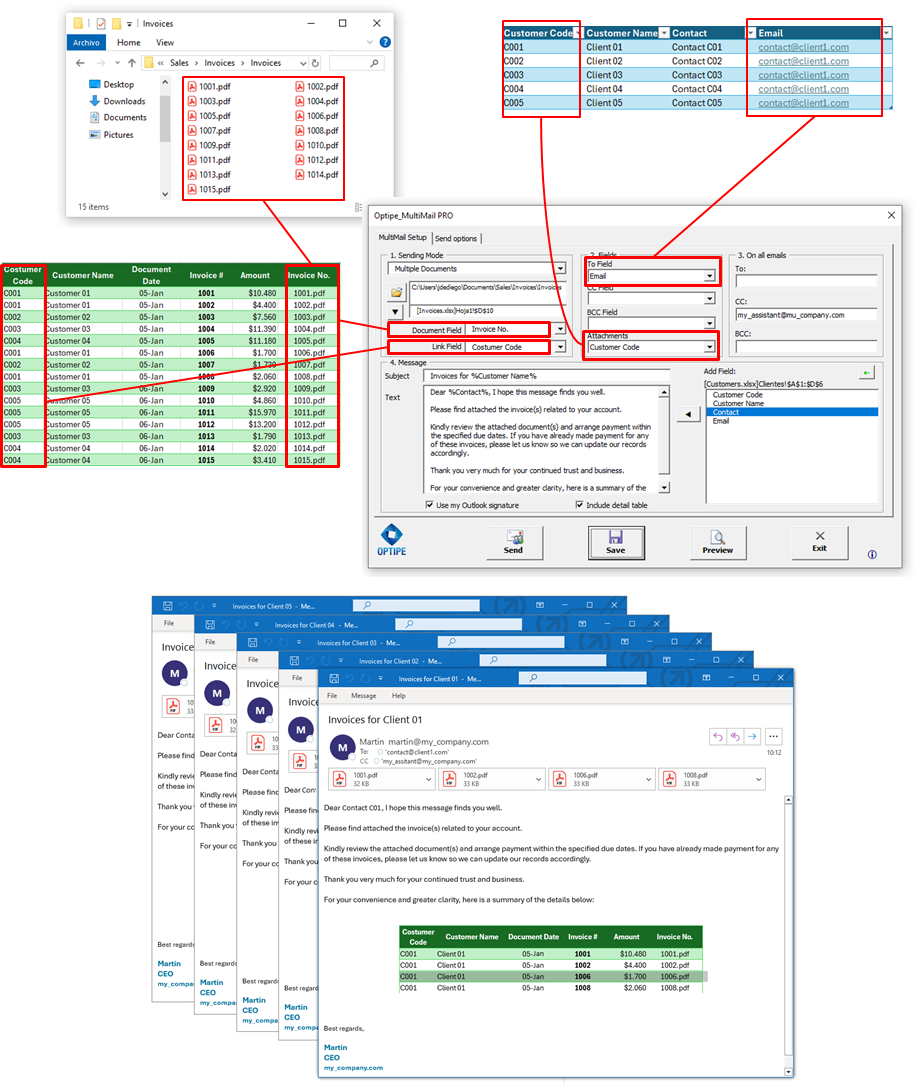
MultiMail scans your target local folder, matches the key grouping column from your Excel sheet (such as Client ID or Employee Number), and gathers all corresponding attachments. Optionally, you can insert a dynamic table summary of the attached files directly inside the email body:
When Should You Send Multiple Documents per Recipient from Excel?
Email each customer all their pending PDF invoices of the month in a single message, avoiding inbox overload and billing disputes.
Deliver pay stubs along with tax withholding receipts, contract annexes, or vacation statements in one secure email to each employee.
Attach purchase orders accompanied by delivery notes, shipping manifests, and quality certificates to respective vendors.
Embed an outstanding invoice summary table inside the email body and attach all matching PDF files in the same dispatch.
Setup and Advanced Configuration
See the complete MultiMail step-by-step user guide to review how to link local folders with Excel indexing columns, schedule pauses between dispatches, and run the Zero Errors engine to verify all files exist before sending.
Security and Operational Efficiency
Centralize multi-attachment dispatching without flooding recipient inboxes. Because processing runs 100% locally on your machine via Outlook, confidential company files are never uploaded to third-party servers.
While MultiMail automatically batches and sends your files, you can focus on higher-value analysis… or simply enjoy a fresh cup of coffee ☕.
📚 Practical Guides from our Blog:
- How to Send Invoices and Reports from Excel by Email
- How to Send Pay Stubs and Certificates from Excel
- How to Send Personalized Email Reminders from Excel
- Personalized vs Bulk Email from Excel: When to Use Each
- How to Create an Excel File for Each Customer, Branch Office or Department
- How to Export Every Excel Worksheet to PDF Automatically
Explore other Optipe MultiMail sending modes:


Boost your team's administrative productivity
Automate the delivery of multiple personalized documents and invoices per contact with maximum security and speed.
