The effectiveness of a communication is not measured by the number of emails sent, but by the actions it generates. Event invitations, training sessions, internal activities, and corporate reminders all share a common goal: encouraging people to respond, participate, or take action. When messages are generic and impersonal, achieving that goal becomes much more difficult. In this article, we will explore how personalized communications can improve engagement and increase response rates without adding administrative workload.
Imagine this: You need to invite 80 employees to a company event and also send reminders for a mandatory compliance training. You draft a generic email, send it out… and days later realize many employees didn’t respond, confirm, or attend.
Keep sending generic emails with low engagement? ❌
Or send personalized invitations that actually drive participation? ✅
This is exactly why I built MultiMail: to generate fully personalized emails from Excel and deliver them through Outlook securely and efficiently.
Are you still sending documents one by one? Reports, certificates, invoices and personalized documents can be distributed automatically from Excel. Optipe MultiMail creates personalized emails and attaches the correct file for each recipient in just a few minutes.
TRY IT. YOU'LL GET IT.
📊 Common Issues in Internal Invitations and Notifications
📩 Generic, impersonal emails
The same message is sent to everyone without context.
Real impact: Low engagement and poor response rates.
📉 Low participation rates
Recipients don’t feel the email is relevant to them.
Real impact: Poor attendance and missed activities.
🔁 Constant follow-ups
You need to resend reminders repeatedly.
Real impact: Time waste and email fatigue.
🤖 Ineffective communication
Messages fail to trigger action.
Real impact: Low compliance in mandatory processes.
⚡ How MultiMail Solves This with Personalized Notifications
MultiMail allows you to send fully personalized individual emails directly from Excel, generating a unique message for each recipient and delivering it through Outlook.
Personalized Notifications Mode
Unlike traditional bulk emails, this mode generates a unique message per recipient, allowing you to tailor content, context, and tone for each individual.
- Personalization by name, department, activity, or date
- More direct and engaging communication
- Higher response and participation rates
- Automated sending from Excel → Outlook
💡 Key practical tip: You can insert an image directly into the email body (for example, an event invitation flyer) from the sending options tab. This significantly improves visual impact and open rates.
💡 Message formatting: You can highlight key content using simple HTML, for example: <b>Confirm your attendance before Friday</b>.
💡 Filter your data before sending: Remember that you can apply filters to your Excel table to segment your recipients. For example, you can temporarily hide rows for employees on sick leave or exclude courses that have already ended, ensuring you only send emails to those with pending matters.
🎯 Practical Examples with MultiMail
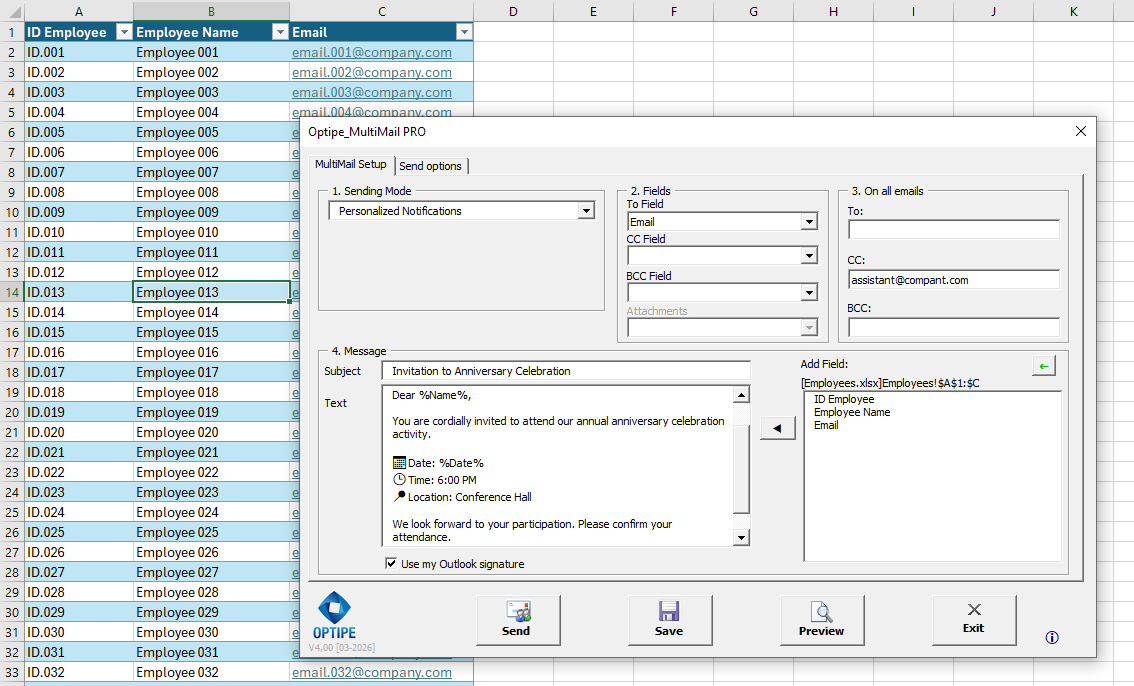
Example 1: Corporate Event Invitation
Each employee receives a personalized invitation with their name and event details.
Subject: Invitation to Anniversary Celebration
Dear %Name%,
You are cordially invited to attend our annual anniversary celebration activity.
📅 Date: %Date%
🕒 Time: 6:00 PM
📍 Location: Conference Hall
We look forward to your participation. Please confirm your attendance.
Best regards,
Management Team
📌 You can embed the invitation design (image) within the email body.
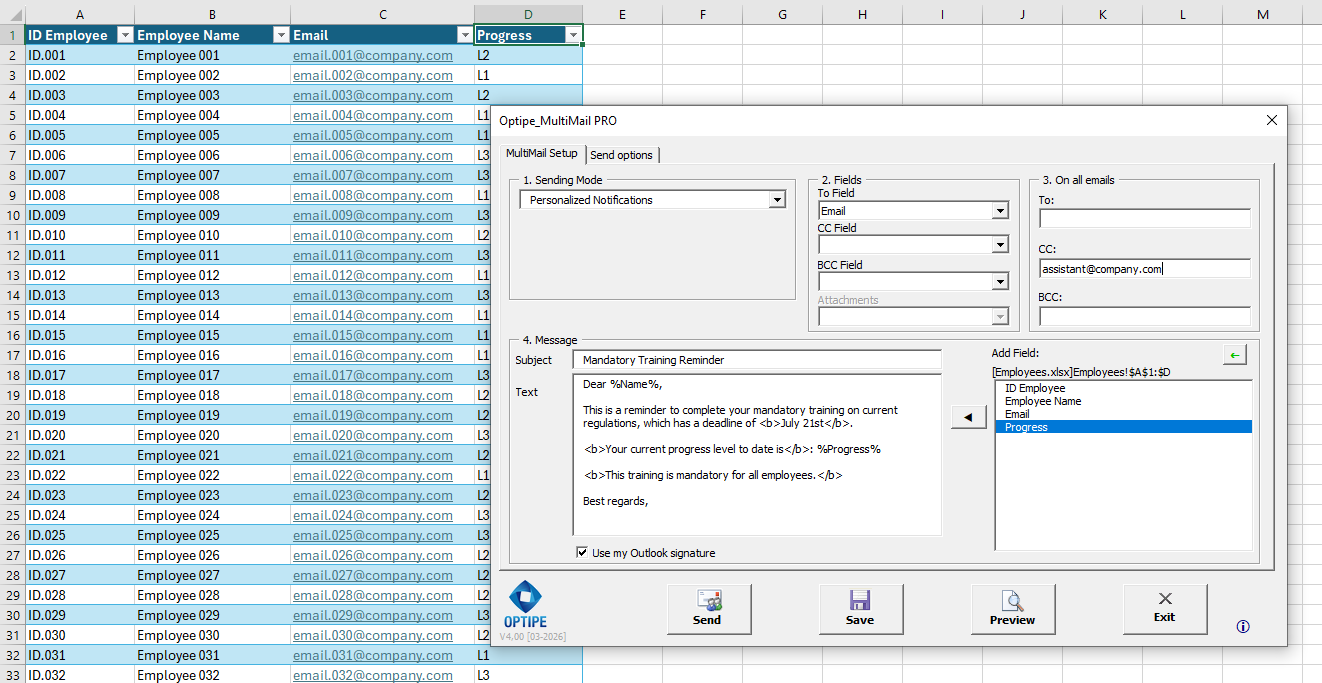
Example 2: Mandatory Training Reminder
Personalized reminder for compliance training.
Subject: Mandatory Training Reminder
Dear %Name%,
This is a reminder to complete your mandatory training on current regulations, which has a deadline of July 21st.
Your current progress level to date is: %Progress%
This training is mandatory for all employees.
Best regards,
Human Resources
⏱️ Real Impact on Time and Engagement
| Scenario | Time | Outcome |
|---|---|---|
| Generic email | ~2 minutes | Low response rate |
| Manual individual emails (80 recipients) | ~2 hours | High error risk |
| MultiMail | ~3 minutes | High engagement |
📚 Related Articles
📚 Recommended Resources from Excel Experts
📚 Want to keep improving your Excel productivity?
Go to Optipe Blog →Automate your Excel work and save hours every week
Data Tools Suite includes 18 applications to automate data management, tables and worksheets in Excel.
MultiMail lets you send personalized emails, documents and reports directly from Excel.
TRY IT. YOU'LL GET IT.
🚀 Download Freemium Version