Tired of copying and pasting into new sheets? Split your tables in 1 click and generate individual reports by category instantly.
The Split into Sheets application of Optipe Data Tools Suite lets you divide an Excel table into multiple tabs based on a specific criterion (salesperson, customer, date, etc.) quickly and without manual errors.
Did you know you can expand Excel's features with add-ins?
Optipe Data Tools Suite is the suite with the apps you need to save hours of work in Excel every week. Automate repetitive tasks in just a couple of clicks: no complex formulas, no macros, and no wrestling with AI prompts. This feature is part of the suite.
Automate routine data work instantly with Optipe and reserve your time for strategic analysis.
It installs directly into the Excel ribbon, is available in Freemium and Pro versions, and you can start using it in under a minute. TRY IT. YOU'LL GET IT.
🎥 See Split into Sheets in action
Process Visualization:

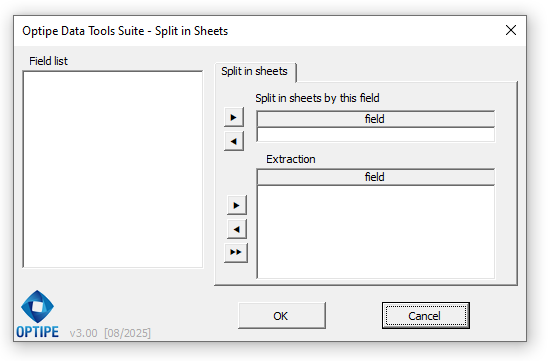
Application Interface:
Why use Split into Sheets for your reporting?
Create a new sheet for each unique value in the selected column.
You decide which columns to include in the new sheets and which to leave out.
Maintains your data formatting and organizes your Excel workbook professionally.
💥 Automate your report creation
Forget about repetitive filtering, copying, and pasting. With Optipe, it's that simple:
- Generate dozens of sheets in seconds from a master table.
- Zero copying errors: The tool ensures data integrity.
- Total Synergy: Once split, you can send them by email with MultiMail.
📚 Related Articles
Technical Features:
- Direct extraction: Sheets are created within the same workbook.
- Define fields: Choose exactly which columns you want to extract.
- Multi-selection: Use Ctrl to select non-consecutive fields.
- Compatibility: Works with tables of any size.
- Local processing: Absolute privacy for your corporate data.
Need to implement this for your team?
Boost your department's productivity with a professional and secure solution.

