If you need to remove an Optipe add-in from Excel or prepare your system to upgrade to a PRO version, you can do it in two simple ways:
⚡ Method 1: Automatic Uninstallation (Recommended)
This is the fastest and safest way. Follow these steps:
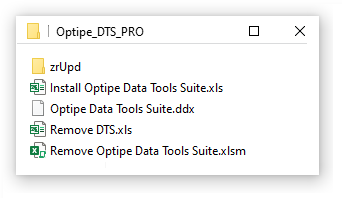
- Open the local folder where your Optipe software is saved.
- Find and run the file named "Remove Optipe".
- The wizard will automatically and cleanly remove the add-in from your Excel ribbon.
🔧 Method 2: Manual Uninstallation in Excel
If you prefer to remove the application directly through the Microsoft Excel interface, follow this step-by-step procedure:
Step 2.1: Deactivate the Add-In
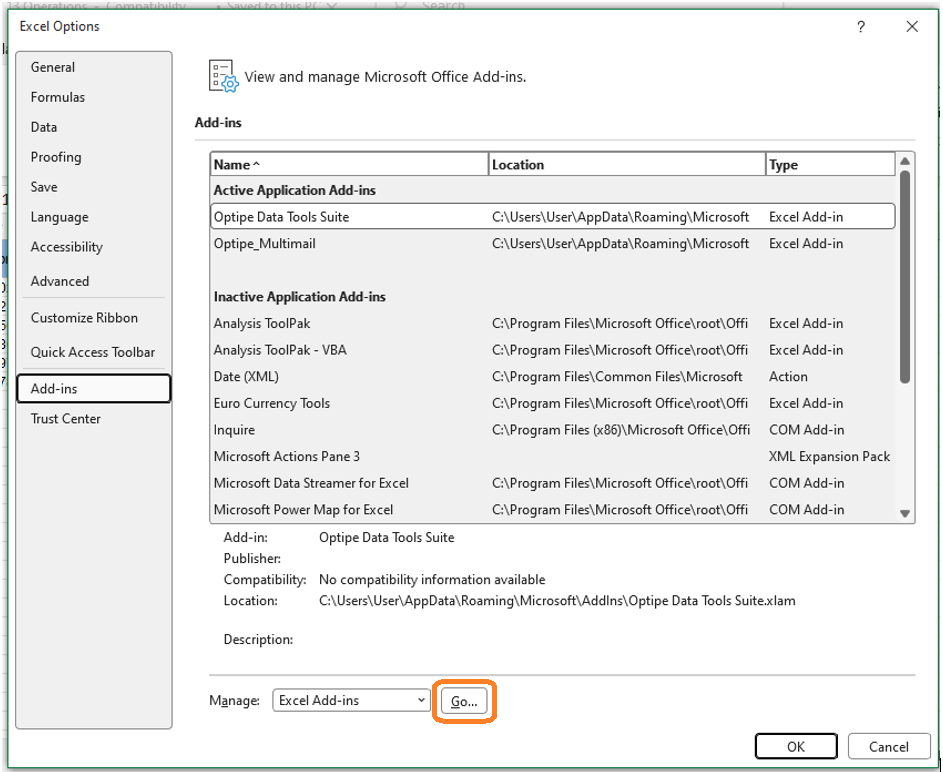
- Go to the File menu and select Options.
- In the Excel Options window, click on the Add-ins category (left sidebar menu).
- At the bottom, in the Manage section, make sure to select "Excel Add-ins" and click the Go... button.
Step 2.2: Confirm removal from the list
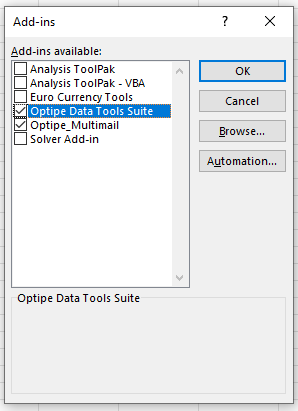
In the pop-up window, uncheck the **checkbox** next to the Optipe application you wish to remove. Then click **OK**.
⚠️ Step 2.3: Delete the physical application file
To permanently delete the add-in file and clear the registry entry:
- Repeat the steps from point 2.1 and open the window again using the Go... button.
- Click the Browse... button to open the root folder of your system add-ins.
- Find the corresponding Optipe application, select it, and delete it (by pressing Delete).
? IMPORTANT: Take extreme care not to delete any other system file in this folder.
Still experiencing problems with the Excel menu? Do not hesitate to contact our This email address is being protected from spambots. You need JavaScript enabled to view it. .
