Managing employee documents does not end when they are generated. The real challenge begins when they must be distributed securely, confidentially, and individually to each employee. Payslips, employment certificates, vacation statements, and other sensitive documents require delivery processes that ensure both operational efficiency and information security. In this article, we will explore how to automate the individual distribution of these documents directly from Excel, reducing risks and freeing up time for higher-value activities.
Imagine this: It is the end of the month, and you need to send pay stubs to 50 employees, verification letters to 15 people, and PTO summaries to another group. You search for the PDFs, rename files, attach them one by one, double-check recipients... several exhausting hours later, you finish with the constant anxiety of having accidentally mixed up someone's confidential data.
Manually attaching pay stubs one by one, constantly worrying if you're sending confidential data to the wrong person? ❌
Or completing the secure, personalized mass mailing in just a few minutes? ✅
Automate bulk email sending directly from Excel and Outlook. Invoices, reports, payslips, and statements delivered in seconds: Optipe MultiMail generates personalized emails and attaches the exact file for each recipient in just 2 clicks—fast, local, and secure.
TRY IT. YOU'LL GET IT.
1-minute setup • No registration required • Fully functional
📊 Common Pain Points When Sending Documents from Excel
Manual Bulk PDF Retrieval and Attachment
Searching for the correct file for each employee and attaching them one by one.
Real impact: High risk of human error and massive time drain.
Manual Mail Merges or Buggy Macros
Configuring individual emails or dealing with brittle, unmaintained VBA code.
Real impact: Complex, slow, and highly difficult to keep functional.
Data Privacy Breaches with Confidential Files
Accidentally sending an employee's financial data or pay stub to the wrong colleague.
Real impact: Severe confidentiality issues and potential compliance liabilities.
Monotonous and error-prone routine
The mechanical task of searching, attaching, and sending drains hours that should be spent on strategic HR management.
Real issue: Mental fatigue at the end of the month and a high risk of oversight errors due to exhaustion.
⚡ How to send pay stubs and employment certificates from Excel
MultiMail works seamlessly directly within Excel and Outlook, ensuring secure and individual delivery. The most widely adopted modes for HR operations are:
1. Send Files and Documents
🟢 MultiMail Solution
Generate all PDFs into a temporary folder, point to the column with the unique identifier (Employee ID or Code), and MultiMail instantly matches and attaches the right file to the right recipient. Ideal for monthly pay stubs, tax records, or individual contracts.
2. Send Multiple Documents per Recipient
🟢 MultiMail Solution
When a single employee needs to receive several independent records mapped via an associative list (such as historical PTO statements or custom project logs), MultiMail groups them intelligently and sends a single email containing all consolidated attachments.
💡 Practical Batch Suggestion: Generate your current period's documents in a clean, temporary folder dedicated exclusively to the ongoing batch mailing. Once processed by MultiMail, transfer the files to your permanent archive folders. Working strictly with the active month's batch minimizes naming conflicts and significantly speeds up indexing.
🎯 Step-by-Step Practical Examples with MultiMail
To understand the full operational flexibility of the add-in, let's break down the two most frequent scenarios managed by HR professionals worldwide using global structured data layouts.
Example 1: Mass Emailing Pay Stubs / Payslips (Files and Documents Mode)
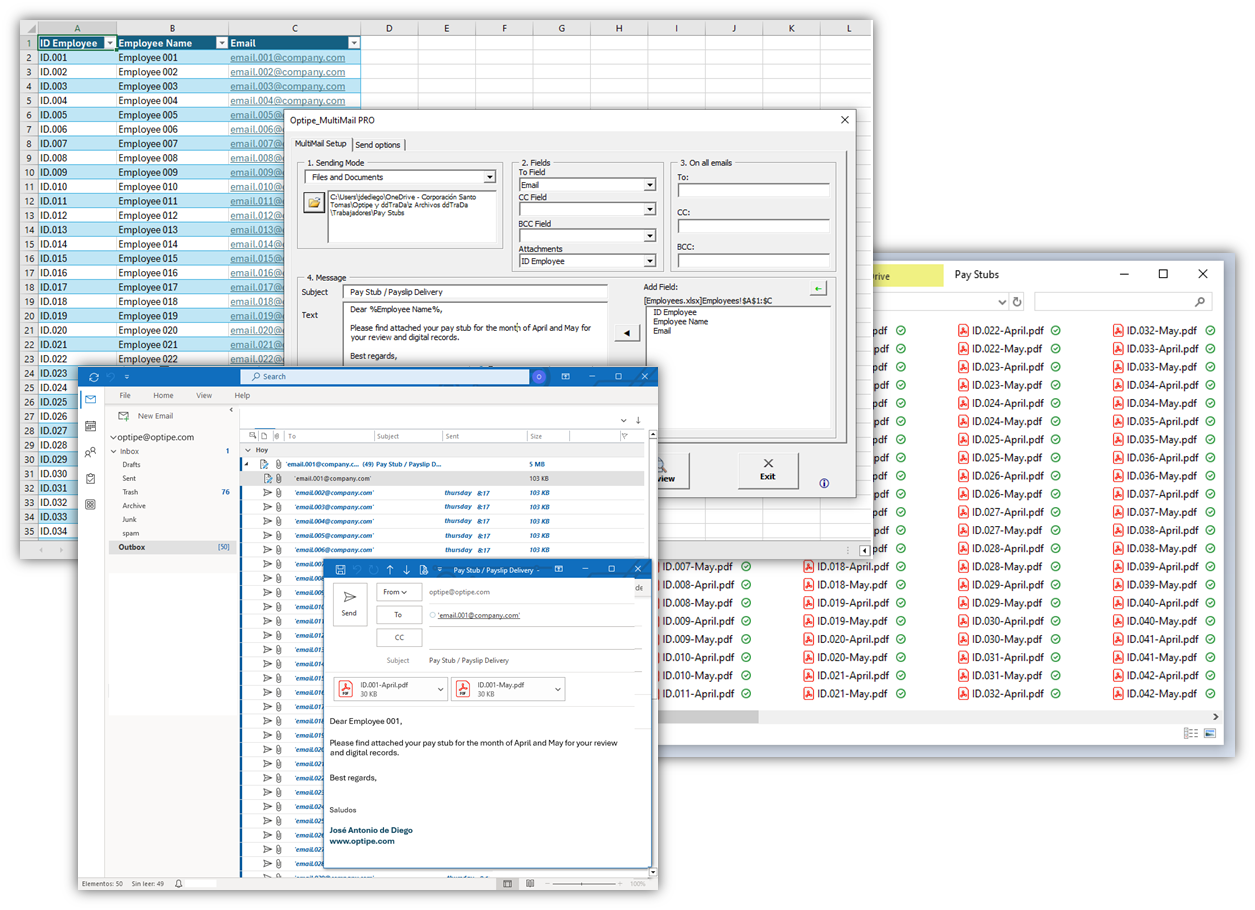
In this first setup, we maintain a master Excel spreadsheet containing our workforce's basic details and respective email addresses. The physical PDF files stored in our folder contain the unique Employee ID directly within the file name (e.g., ID.001-April.pdf, ID.001-May.pdf).
By running the add-in in Files and Documents mode, MultiMail automatically scans the selected Employee ID column, crawls your folder in seconds for matching strings, pairs the files precisely to their corresponding recipients, and builds tailored mass emails.
📝 Sample Message Structure (Standard English):
Subject: Pay Stub / Payslip Delivery
Dear %Employee Name%,
Please find attached your pay stub for the month of April and May for your review and digital records.
Best regards,
Human Resources Department
Example 2: Distributing PTO Statements / Records (Multiple Documents Mode)
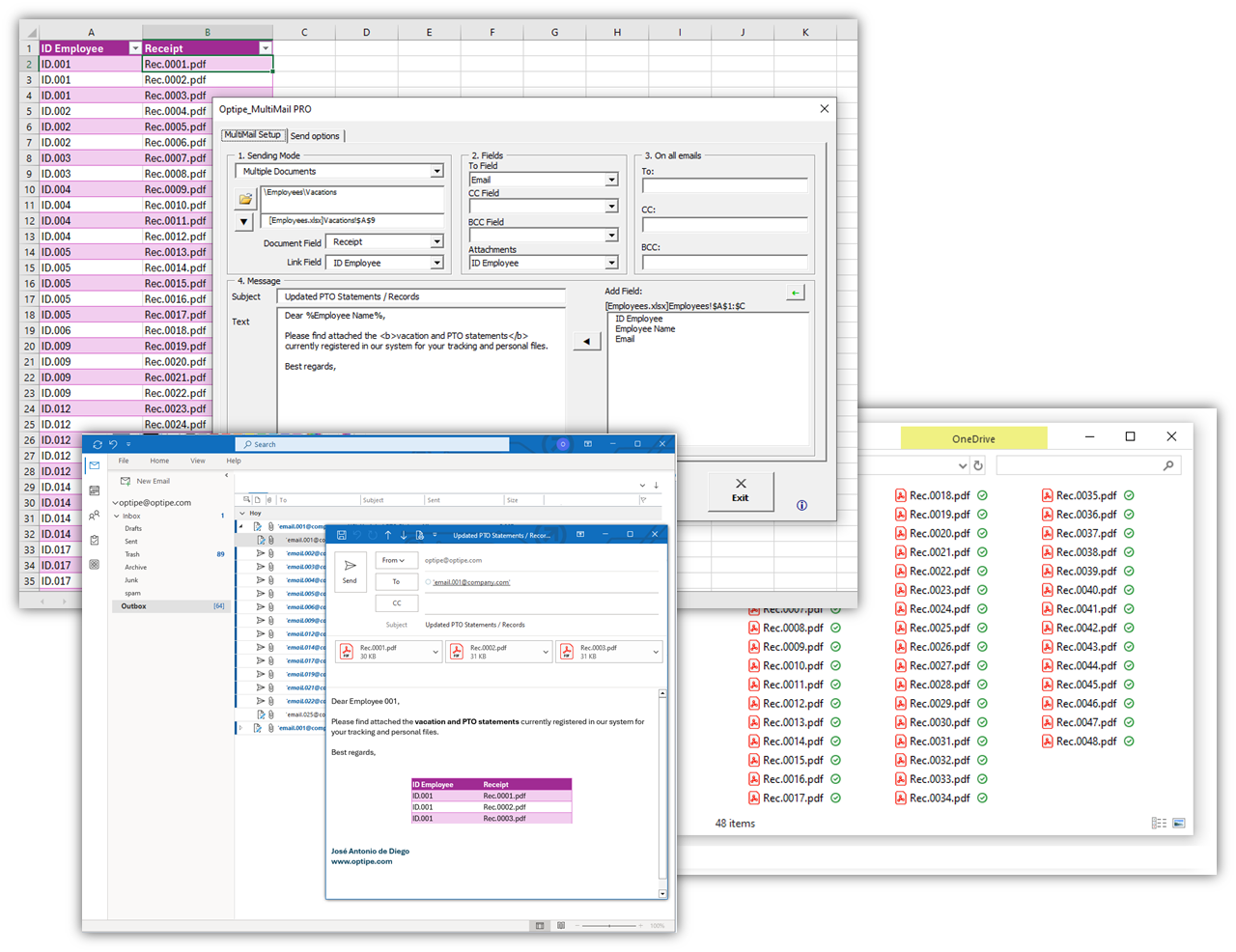
In this second workflow, the underlying logical criteria changes entirely. The raw files sitting in your drive DO NOT feature the employee's ID in their filenames; instead, they are labeled using a purely internal document serial number (e.g., Comp.0001.pdf, Comp.0002.pdf).
To resolve this seamlessly, we employ an associative reference matrix table in Excel matching each Employee ID with every individual voucher number generated. When running MultiMail under Multiple Documents mode, the system parses the relational list, dynamically stacks all rows belonging to a single worker, and pushes out one single personalized email containing all their distinct files grouped together beautifully.
📝 Sample Message Structure (Standard English):
Subject: Updated PTO Statements / Records
Dear %Employee Name%,
Please find attached the vacation and PTO statements currently registered in our system for your tracking and personal files.
Best regards,
Human Resources Department
📌 Operational Summary: While the first example runs a lookup directly off the root file name, the second highlights MultiMail's powerful relational capability to bundle scattered, disparate files under a single recipient, entirely mitigating data breach risks.
⏱️ Real Administrative Time Savings
| Task (50-100 employees) | Manual Delivery | With MultiMail |
|---|---|---|
| Sending pay stubs and vacation statements | 2-4 hours | 8-15 minutes |
| TOTAL MONTHLY EFFORT | 15+ hours | Less than 1 hour |
📚 Related Articles
📚 Recommended Resources
📚 Want to keep improving your Excel productivity?
Go to Optipe Blog →Automate your Excel work and save hours every week
Data Tools Suite includes 18 applications to automate data management, tables and worksheets in Excel.
MultiMail lets you send personalized emails, documents and reports directly from Excel.
TRY IT. YOU'LL GET IT.
🚀 Download Freemium Version