Tired of cleaning data cell by cell? Standardize your text in 1 click and forget about tedious Excel formulas. Try it. You'll get it.
The Clean & Transform Text application in Optipe Data Tools Suite is the ultimate solution for cleaning data in Excel. It allows you to modify characters, strings, and text values in bulk with precision and without writing a single formula. Ideal for cleaning data, removing symbols (commas, dashes, and more), replacing accents, or converting text to uppercase or lowercase efficiently.
Did you know you can expand Excel's features with add-ins?
Optipe Data Tools Suite brings together 18 tools for Excel designed to automate repetitive tasks in just a couple of clicks: no complex formulas, no macros, and no wrestling with complex AI prompts. This application is one of them.
Automate routine data work instantly with Optipe and reserve your time (or AI) for strategic analysis.
It installs directly into the Excel ribbon, is available in Freemium and Pro versions, and you can start using it in under a minute. TRY IT. YOU'LL GET IT.
What can you do with Clean and Transform Excel Text?
Click on an option to go directly to the explanation:
- Change text case (UPPERCASE, lowercase, Proper Case, or Sentence Case)
- Remove leading, trailing, and extra spaces in text
- Convert numbers stored as text to actual numerical format
- Remove accents, tildes, and special characters
- Find and replace specific text strings or characters
- Add prefixes or suffixes to cells in bulk
Process Visualization:

Application Interface:
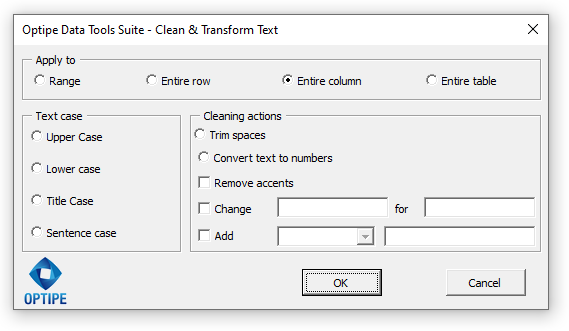
Why use Clean & Transform Text for your management?
Clean text from files provided by different users or systems in seconds.
Easily process numerical data that was incorrectly entered as text.
Standardize data extracted from the web by removing accents, extra spaces, and special characters.
💥 Forget complex nested formulas
Did you know that combining functions like UPPER, TRIM, and SUBSTITUTE consumes valuable time? With Optipe it's very simple:
- Convert to Uppercase, Lowercase, or Title Case with one click.
- Remove accents and characters that prevent successful data matching.
- Bulk add prefixes or suffixes to thousands of records.
Technical Features / Characteristics:
- Case Format: Uppercase, lowercase, sentence case, and title case/proper name.
- Cleaning: Removes unnecessary spaces and eliminates accents (tildes).
- Conversion: Transforms numerical data in "text format" into real numerical values.
- Editing: Replace text strings and add prefixes or suffixes.
- Scope: Applicable to selected cells or entire columns.
You may also be interested in:
📚 Related Articles
If you regularly clean, analyze, and prepare text data in Excel, these resources may be useful.
💡 Quick 1-click action: You can also use the direct buttons in OneClic (included in the Optipe ribbon) to convert text to UPPERCASE, lowercase, Title Case, or convert text to numbers instantly. View OneClic in detail →
Change text case (UPPERCASE, lowercase, Proper Case, or Sentence Case) in Excel
Need to convert hundreds or thousands of cells to UPPERCASE, lowercase, Title Case, or Sentence case? Clean and Transform Text changes the text format of an entire Excel range with a single click—no UPPER, LOWER, or PROPER formulas required.
When is this useful?
- Standardize customer and employee names.
- Fix databases with inconsistent capitalization.
- Apply a professional format to product descriptions or reports.
Examples of use: Perfect for cleaning customer databases, standardizing product catalogs, correcting imported records, or preparing professional-looking Excel reports in seconds.
Remove leading, trailing, and extra spaces in Excel texts
Are VLOOKUP, XLOOKUP, or MATCH returning errors even though the data exists? Hidden spaces are often the cause. This feature automatically removes leading, trailing, and extra spaces to leave your Excel data perfectly clean.
When is this useful?
- Clean data before merging or comparing tables.
- Fix product codes copied from websites or external systems.
- Prevent lookup and matching errors caused by hidden spaces.
Examples of use: Ideal for cleaning customer IDs, product codes, inventory lists, or imported databases before running lookups, reports, or data analysis.
Convert numbers stored as text in Excel
Does Excel display the green triangle and refuse to calculate your values? Convert numbers stored as text into real numeric values in bulk so you can use formulas, sorting, filters, and PivotTables normally again.
When is this useful?
- Import data from ERP or accounting systems.
- Fix exported reports stored as text.
- Prepare data before calculations and analysis.
Examples of use: Perfect for repairing financial reports, price lists, inventory files, and accounting data exported from SAP, Microsoft Dynamics, Oracle, or other business systems.
Remove accents, tildes, and special characters in Excel
Need to remove accents or special characters before exporting your data? This feature automatically replaces accented characters with their standard equivalents, improving compatibility with databases and external systems.
When is this useful?
- Prepare files for bulk imports.
- Create email addresses or usernames.
- Standardize names across multiple systems.
Examples of use: Ideal for exporting customer databases, generating clean usernames or email addresses, and preventing duplicate records caused by accented characters.
Find and replace specific text strings or characters
Need to replace a word, symbol, or text fragment across thousands of Excel cells? This feature finds the specified text and replaces—or removes—it throughout the selected range in just a few seconds.
When is this useful?
- Correct repeated typing mistakes.
- Update product or brand names.
- Remove unwanted symbols or characters.
Examples of use: Perfect for correcting large datasets, updating company names after a rebranding, removing formatting characters from IDs, or cleaning imported Excel data.
Add prefixes or suffixes to Excel cells
Need to add the same text to the beginning or end of hundreds of cells? Automatically insert prefixes or suffixes into every selected cell without writing CONCAT, TEXTJOIN, or other Excel formulas.
When is this useful?
- Add country or area codes to phone numbers.
- Append file extensions to filenames.
- Create product IDs or internal codes.
Examples of use: Ideal for formatting phone lists, generating document names, building product codes, or updating thousands of Excel records automatically.
🎥 Watch Clean & Transform Excel Text tool in action
1. Standardize and clean text:
2. Add prefixes or suffixes to text:
3. Convert text-formatted numbers to values:
Need to implement this in your team?
Optimize your department's productivity with a professional and secure solution.
