Are you still comparing your lists using long formulas or VLOOKUP?
Compare Excel columns and lists, reconcile data, and detect discrepancies in seconds, without #N/A errors and without writing a single formula.
Comparing Excel columns and lists is a common task when performing data reconciliation, audit procedures, report validation, or cross-checking information between different systems. The Compare Lists tool from Optipe Data Tools Suite allows you to compare two tables using up to 3 matching criteria, identify matching records, detect missing entries, and find discrepancies in amounts or quantities. Forget about VLOOKUP, XLOOKUP and manual validation processes: get clear and reliable results in seconds.
🎥 See Compare and Reconcile Lists in action (in 40 seconds)
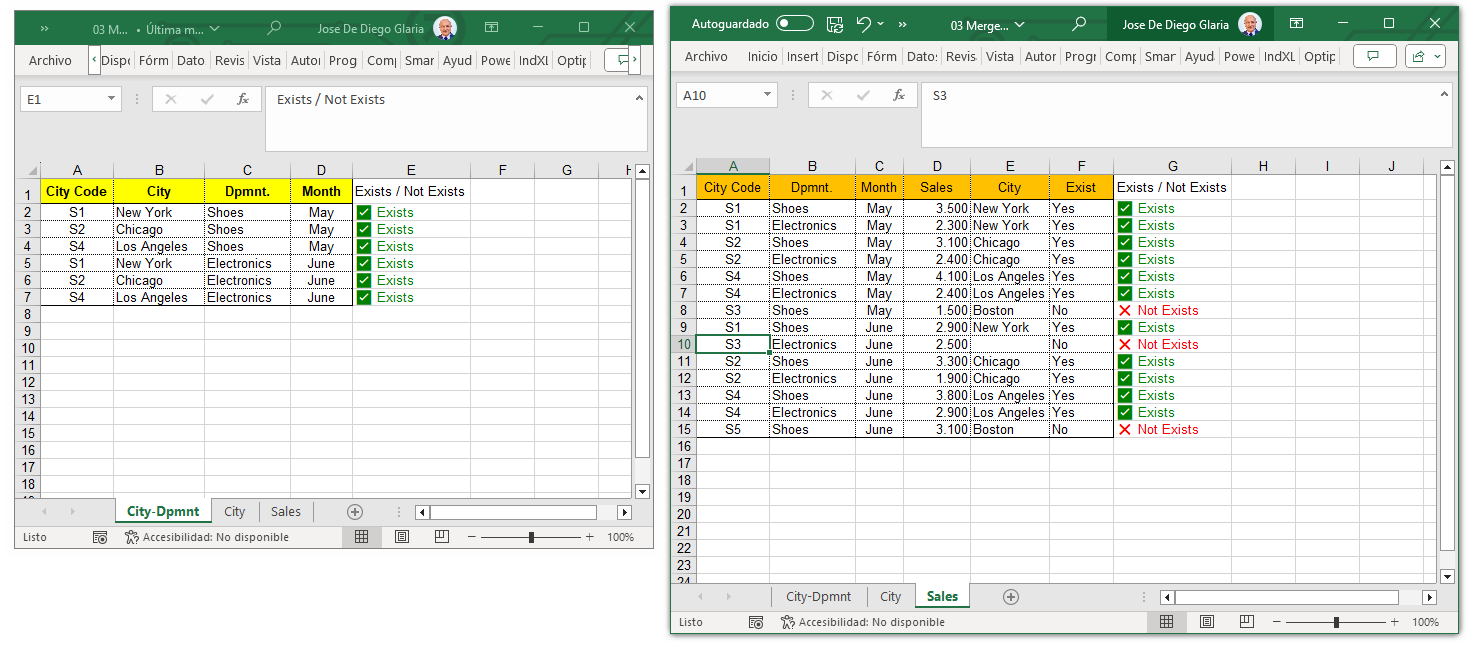
Process Visualization:
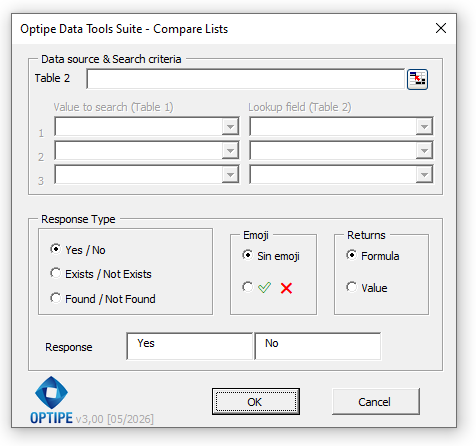
Application Interface:
Why use Compare Lists for your audits?
Compare two databases and automatically identify matching records without altering your original data.
Find differences in amounts, quantities, or values even when matching records exist in both tables.
Audit ERP exports, CRM reports, inventory files, budgets, and operational reports in seconds.
What can you achieve by comparing lists in Excel?
- Check whether a record exists or does not exist in another table.
- Compare data using up to 3 matching criteria simultaneously.
- Detect discrepancies in amounts, quantities, or associated values.
- Perform data reconciliations between two reports or systems.
- Validate inventory, sales, budget, and operational reports.
- Identify missing records and data inconsistencies.
💰 Data Reconciliation and Discrepancy Detection
Compare Lists not only determines whether a record exists in another table. It can also validate amounts, quantities, and associated values, automatically identifying discrepancies between matching records.
This turns the application into a powerful reconciliation tool for finance departments, controllers, auditors, inventory managers, operations teams, and business analysts.
Possible Results:
- ✅ Correct: the record exists and the value matches.
- ⚠️ Discrepancy: the record exists but the associated value is different.
- ❌ Not Found: the record does not exist in the other table.
The application can also calculate the difference between both sources automatically, simplifying reconciliation and validation processes.
Practical example of comparing lists in Excel
Imagine you have two lists:
- Registered clients in your master system.
- Clients who generated invoices during the month.
And you urgently need to know:
- Who appears in both lists? ✅
- Which clients are missing their invoice this month? ❌
With traditional Excel, you would have to deal with nested functions and clean up annoying errors. With Compare Lists, you select your columns and get a clean result in seconds.
💥 Reconcile Data and Detect Discrepancies Automatically
Ideal for business validation processes where you need to know which records match, which ones are missing, and which contain discrepancies.
- Compare tables using up to 3 matching criteria.
- Detect discrepancies in amounts and quantities.
- Calculate differences automatically.
- 100% local processing: maximum speed and data security.
Technical Specifications / Features:
- Comparison using 1, 2, or 3 matching criteria simultaneously.
- Optional validation of amounts, quantities, and numeric values.
- Response states: Correct, Discrepancy and Not Found.
- Automatic calculation of differences between both tables.
- Configurable tolerance for reconciliation processes.
- Output as Excel formulas or constant values.
- Compatible with Shift and Ctrl multiple field selection.
- Results are added neatly after the last column of the table.
Need to implement this for your team?
Optimize your department's productivity with a secure, professional solution.

