Automatically consolidating Excel forms allows you to transform multiple worksheets with the same structure into a single database ready for reporting, analysis, dashboards, and management control processes. This requirement frequently appears in administration, human resources, finance, purchasing, auditing, and operations.
Many organizations use individual forms or templates to collect information. Each worksheet contains a separate record, but eventually all data must be consolidated to create reports, statistics, summaries, or business analysis.
Imagine this situation: you have dozens of reimbursement requests, evaluations, surveys, or administrative forms stored in separate worksheets. Before you can analyze the information, everything must be transformed into a structured database.
Copy and paste every form manually? ❌
Create a consolidated database automatically? ✅
Are you still doing this manually? Cleaning data, matching tables, consolidating files and preparing reports can consume hours every week. Data Tools Suite automates these tasks directly inside Excel so you can focus on analysis instead of repetitive work.
TRY IT. YOU'LL GET IT.
📋 Business Situations Where Form Consolidation Creates Value
Forms
Transform multiple forms into a single database.
Surveys
Prepare survey responses for reporting and analysis.
Administration
Consolidate requests, registrations, and administrative processes.
Auditing
Centralize checklists and inspection records for review.
⚡ Transform Individual Forms into a Consolidated Database
The Consolidate Forms application automatically extracts information from multiple worksheets that share the same structure and converts it into a single table.
Each form becomes a separate record within a new database, making it possible to create reports, indicators, dashboards, and management analysis.
The result is a structured dataset ready for business use.
🔴 Traditional Method
- Open every individual form.
- Copy data manually.
- Paste information into a summary table.
- Check for errors and omissions.
- Repeat the same process over and over.
🟢 With Consolidate Forms
- Read multiple forms automatically.
- Create a consolidated database.
- Preserve the original structure.
- Reduce manual errors.
- Prepare data for reporting and analysis.
📝 Example: Consolidating Reimbursement Request Forms
Imagine that every reimbursement request is stored in a different worksheet within the same Excel workbook.
Each form follows exactly the same structure, but the information is distributed across many worksheets.
The application allows specific cells to be mapped and automatically transformed into a consolidated table containing all records.
💡 Note: The same methodology can be applied to surveys, evaluations, registrations, administrative requests, checklists, inspections, and many other data collection processes.
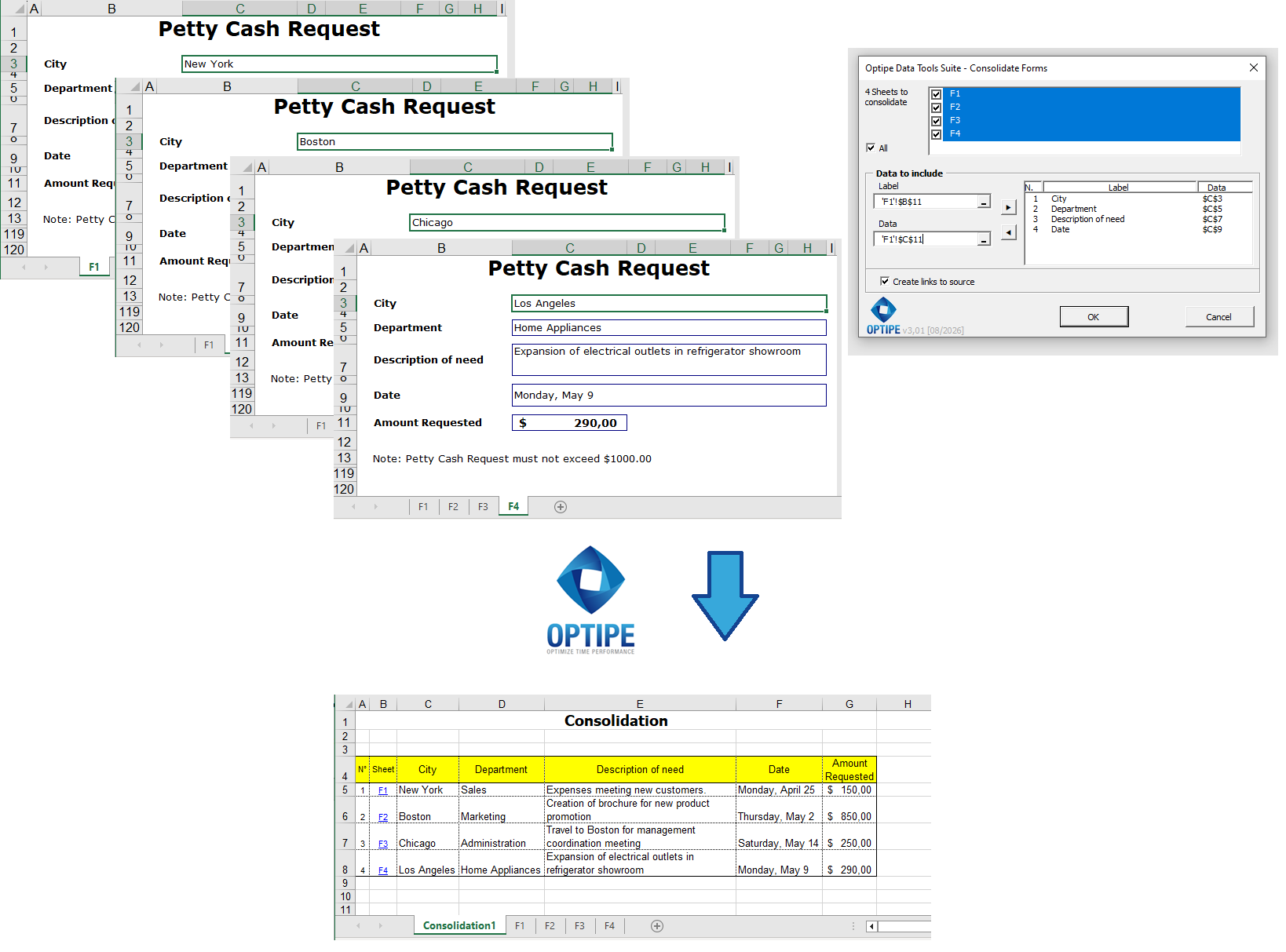
Multiple worksheets containing forms can be transformed automatically into a single consolidated database.
💡 Result
All information becomes available in a single structured table ready for reporting, analysis, and further consolidation processes.
🚀 Much More Than Consolidating Forms
Consolidate Forms does more than collect scattered information. It transforms data collection processes into structured databases ready for reporting, analysis, and decision-making.
- ✔ Consolidate multiple forms into a single table.
- ✔ Create databases ready for reporting and analysis.
- ✔ Preserve the original structure of forms and templates.
- ✔ Reduce errors caused by manual copy-and-paste processes.
- ✔ Simplify future consolidation updates.
- ✔ Automate repetitive data collection workflows.
🎥 Videos: Automatically Consolidate Excel Forms
Learn how to transform multiple forms and templates into a structured database ready for analysis and reporting.
1. How to Consolidate Forms and Templates Step by Step:
2. How to Create Automatic Worksheet Indexes:
📌 Practical Business Use Cases
📝 Administrative Requests
Transform individual requests into a centralized database for monitoring and management.
📊 Surveys
Consolidate survey responses distributed across multiple worksheets for statistical analysis.
👥 Human Resources
Combine evaluations, records, and employee forms into a single structured database.
✅ Audits and Checklists
Centralize inspections, reviews, and compliance controls for consolidated reporting.
💡 From Individual Forms to Consolidated Information
In many organizations, the information already exists but remains distributed across multiple forms and templates.
- Step 1: Capture information using individual forms.
- Step 2: Consolidate all relevant records automatically.
- Step 3: Analyze the information using reports and indicators.
- Step 4: Continue with broader consolidation and data management processes.
This workflow quickly transforms operational forms into information ready for business decision-making.
📚 Tip: Continue with Worksheet Consolidation and Master Workbooks
💡 Next Step: Once form data has been consolidated, it can be integrated into worksheet consolidation processes and master workbook structures for larger-scale reporting and analysis.
👉 How to Consolidate Multiple Excel Worksheets into a Single Table
⏱ Comparison: Manual Method vs. Consolidate Forms
| Manual Method | Consolidate Forms |
|---|---|
| Open every form individually. | Process multiple forms automatically. |
| Copy and paste data repeatedly. | Generate a consolidated database in a single process. |
| Higher risk of human error. | Consistent and repeatable results. |
| Time-consuming preparation work. | Analysis-ready information in seconds. |
| Heavy dependence on manual work. | Automation and scalability. |
❓ Frequently Asked Questions
Do all forms need to have the same structure?
Yes. Consolidation requires templates to maintain the same cell positions and layout.
Can I consolidate surveys and evaluation forms?
Yes. These are among the most common use cases.
Does the application create a new consolidated table?
Yes. The output is a new worksheet containing all records in database format.
Can I update the consolidation when new forms are added?
Yes. New worksheets can be incorporated into future consolidations.
Does it work with administrative forms?
Yes. Requests, checklists, reimbursements, surveys, and administrative records are typical scenarios.
Does my data leave my computer?
No. All processing takes place locally.
📚 Related Articles
Automate your Excel work and save hours every week
Data Tools Suite includes 18 applications to automate data management, tables and worksheets in Excel.
MultiMail lets you send personalized emails, documents and reports directly from Excel.
TRY IT. YOU'LL GET IT.
🚀 Download Freemium Version