Manually copying and moving tabs between workbooks?
Gather and collect worksheets from different open Excel files into a single new workbook in seconds, without formulas and without modifying your source files.
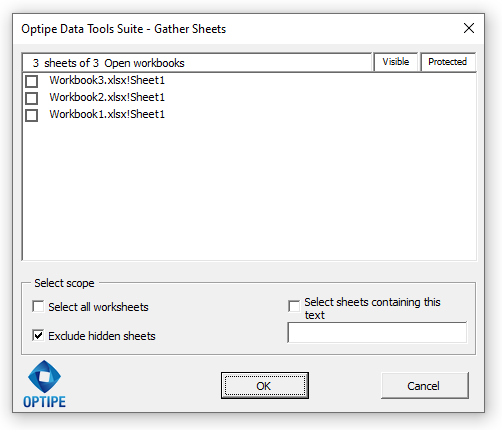
The Gather Sheets application from Optipe Data Tools Suite automatically consolidates worksheets distributed across multiple open Excel files into a single brand-new master workbook. Select all sheets, filter by text matching in their names, or simply pick the exact tabs you need. Your original files remain 100% intact because sheets are copied, never moved.
Did you know you can expand Excel's features with add-ins?
Optipe Data Tools Suite is the suite with the apps you need to save hours of work in Excel every week. Automate repetitive tasks in just a couple of clicks: no complex formulas, no macros, and no wrestling with AI prompts. This feature is part of the suite.
Automate routine data work instantly with Optipe and reserve your time for strategic analysis.
It installs directly into the Excel ribbon, is available in Freemium and Pro versions, and you can start using it in under a minute. TRY IT. YOU'LL GET IT.
🎥 Watch Gather Sheets in action
Process Visualization:

Application Interface:
Why use Gather Sheets in your daily workflow?
Bring dozens of sheets scattered across various workbooks into one file with a single click.
Select all sheets, filter by matching text, or check individual tabs with total flexibility.
Sheets are duplicated into a new workbook, leaving your source files unaltered and safe.
Common Use Cases
- Gather departmental budgets or cost center reports received from multiple teams
- Consolidate monthly financial statements, balance sheets, or payment schedules
- Compile sales reports submitted by different sales reps into one unified workbook
- Collect student grade sheets or administrative records across multiple departments
- Centralize regional operational reports submitted by different branch offices
- Quickly isolate and gather all worksheets sharing a common code, tag, or keyword in their name
💥 Stop moving or copying worksheets one tab at a time
Combining worksheets from multiple workbooks used to be slow, tedious, and prone to mistakes. Optipe streamlines your work:
- Automatically detects all worksheets across currently open Excel workbooks.
- One-click option to exclude hidden sheets for a clean, presentation-ready workbook.
- Instantly creates an independent master file ready to save, audit, or share.
📚 Related Articles
- How to Consolidate Multiple Excel Sheets into One Table
- How to Split an Excel Table into Multiple Sheets Easily
- How to Create Excel Files for Each Customer or Branch
- How to Export Every Excel Worksheet to PDF Automatically
- How to Create a Master Excel Workbook from Multiple Files
- How to Manage Multiple Excel Worksheets in Seconds
Technical Features:
- Bulk gathering of worksheets across all open Excel workbooks.
- Generates a brand-new master workbook containing only selected sheets.
- Completely non-destructive: original workbooks remain untouched.
- Smart scope selection: select all sheets or filter by text match in sheet names.
- Security toggle to automatically exclude hidden sheets from export.
- Displays real-time visibility and protection status for each listed worksheet.
Need to optimize data management for your team?
Eliminate human error and save hours of work with Optipe's professional tools.
