Comparing two columns or lists in Excel is one of the most common tasks when you need to find differences, missing records, matches, or duplicates between two columns. Although you can do it with XLOOKUP, COUNTIF, FILTER, or Power Query, these methods usually require formulas and multiple steps. In this article, you'll discover all the available approaches and an easy way to compare lists automatically in seconds.
In my nearly 30 years working with Excel in the administrative core of various organizations, comparing lists has always been one of the most time-consuming and error-prone tasks. Whether for bank reconciliations, customer matching, inventory audits, or ERP cross-checks, doing it manually generates constant mistakes and wastes valuable hours. That’s why I created the Compare Lists tool inside Data Tools Suite: to remove that friction and allow anyone to compare lists accurately in just seconds.
Imagine this: You have a master list of clients or products and another updated list (from sales, invoicing, or ERP). You need to quickly know which items match, which are missing, and which are duplicated… but doing it manually is slow and prone to errors.
Keep wasting time with formulas and potential errors? ❌
Or compare lists in seconds with clear, reliable results? ✅
Still doing this manually? Merging tables, comparing lists, cleaning data, and consolidating files can take hours each week. Data Tools Suite automates repetitive tasks in 2 clicks inside Excel—no complex formulas or endless prompts—so you can spend your time analyzing.
TRY IT. YOU'LL GET IT.
📊 Most Common Manual Methods (and Their Pain Points)
COUNTIF / COUNTIFS
The most recommended technique to check if a value exists (if result >0 it exists, if 0 it doesn’t).
Real pain: You have to drag the formula, combine it with IF, and then apply formatting to see the results clearly.
VLOOKUP / XLOOKUP
Search for matches and then clean up #N/A errors.
Real pain: Prone to reference errors and hard to maintain when lists change.
Filter + Manual Comparison
Filter one list and manually search in the other.
Real pain: Impossible with thousands of rows. Very prone to human error and omissions.
Pivot Tables or Power Query
Merge tables and then filter differences.
Real pain: Steep learning curve and not always the fastest or most precise solution.
Want to compare lists and find differences instantly? Discover the Compare Lists App →
⚡ Compare Lists Automatically with Data Tools Suite
The Compare Lists tool lets you compare two columns or lists instantly, with multiple analysis modes.
Compare Lists – Find Matches and Differences in Seconds
🔴 Manual Method
- COUNTIF / COUNTIFS + IF to mark existence
- VLOOKUP / XLOOKUP + cleaning #N/A errors
- Manual filters or Pivot Tables
🟢 With Compare Lists
Select the two columns → choose response type → one click and you get clear results. You can also apply a custom number format to automatically highlight with colors and emojis (Yes Exists / No Exists), making visual reading much easier.
🎥 See Compare and Reconcile Lists in action (in 40 seconds)
Practical Example: Compare Two Lists in Excel and Highlight Differences
💡 Cross-Reference Example: Data Matching Between Two Lists
Imagine you need to perform a bidirectional validation to check if records from a master list exist in a detailed transaction report and vice versa. Instead of building complex nested logical formulas, the tool automates the process using optimized counting functions and instant visual formatting.
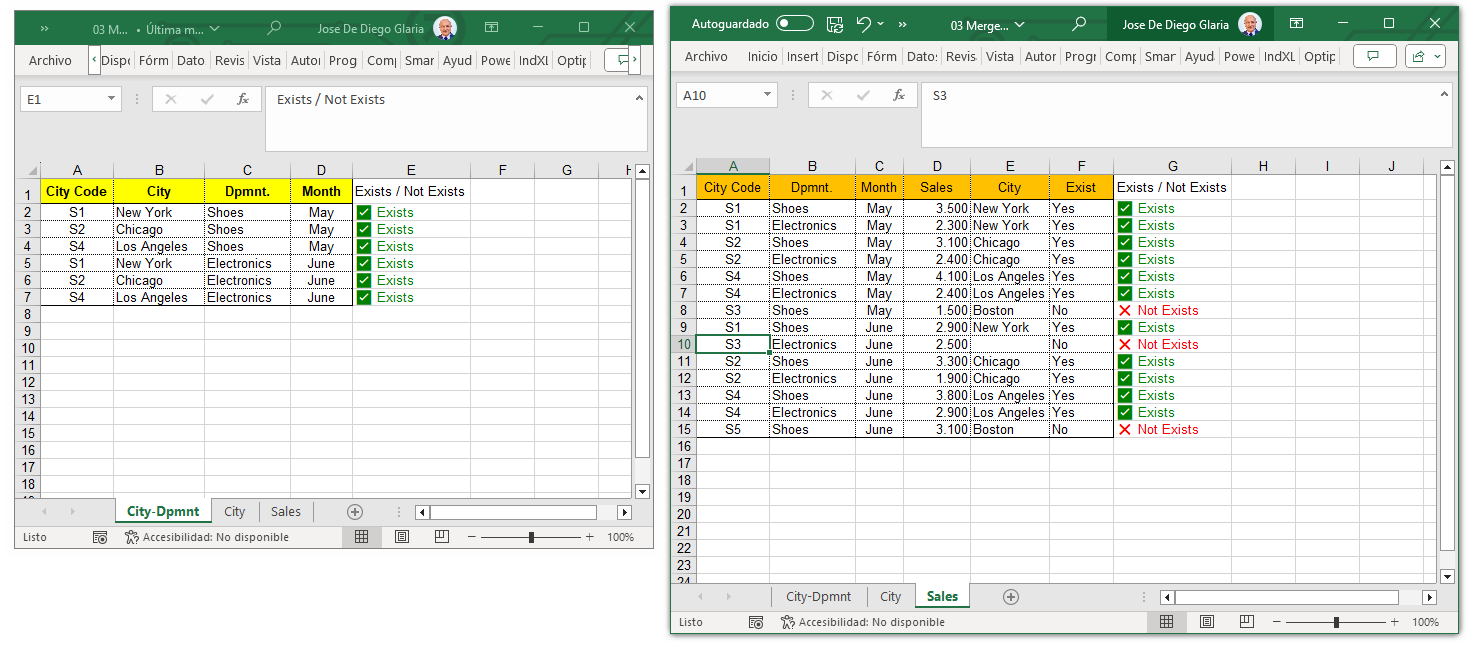 Verifying presence and absence between the control list and the detailed ledger.
1. Validate records from List 1 in List 2 (Cell E2):
Checks if the combination from List 1 (City Code and Department) appears in the List 2 ledger ("Sales").
2. Validate records from List 2 in List 1 (Cell G2):
Checks if each individual transaction from List 2 belongs to the authorized combinations in List 1 ("City-Dpmnt").
💡 The secret lies in Custom Number Formatting: The inserted formula doesn't require heavy logical text arguments; it returns simple matching numbers (0, 1, 2...). The OPTIPE assistant seamlessly applies a special Excel custom format code to the cell, instantly displaying numbers greater than zero as ✔️ Exists and zeros as ❌ Not Exists.
📌 The Suite Advantage: Doing this manually requires writing error-prone array formulas or nested conditionals, as well as manually setting up custom formatting rules for the icons. With Compare Lists, you select both datasets in seconds, and the tool builds the entire cross-reference immediately.
⏱️ Real Time Savings: Manual vs Data Tools Suite
| Task (lists with 5,000-20,000 rows) | Manual | Data Tools Suite |
|---|---|---|
| Compare lists and mark matches/missing items | 45-90 minutes | 15-40 seconds |
| WEEKLY TOTAL | 6-12 hours | 2-3 minutes |
📚 Related Articles
📚 Recommended Resources
📚 Want to keep improving your Excel productivity?
Go to Optipe Blog →Automate your Excel work and save hours every week
Data Tools Suite includes 18 applications to automate data management, tables and worksheets in Excel.
MultiMail lets you send personalized emails, documents and reports directly from Excel.
TRY IT. YOU'LL GET IT.
🚀 Download Freemium Version