Exporting every Excel worksheet to PDF automatically allows organizations to generate reports, statements, certificates and business documents ready for distribution, printing or archiving without manually opening and saving every worksheet. It is a frequent requirement in finance, administration, human resources, operations and management reporting.
Many workbooks contain one worksheet per branch office, department, customer or reporting period. While maintaining information inside a single workbook simplifies administration, distributing the final results often requires separate PDF documents.
Imagine this scenario: your workbook contains monthly reports for New York, Berlin and London. Management requires an individual PDF document for every branch office. How do you generate all PDFs automatically without saving them one at a time?
Save every PDF manually worksheet by worksheet? ❌
Generate all PDF documents automatically? ✅
Still doing this manually? Merging tables, comparing lists, cleaning data, and consolidating files can take hours each week. Data Tools Suite automates repetitive tasks in 2 clicks inside Excel—no complex formulas or endless prompts—so you can spend your time analyzing.
TRY IT. YOU'LL GET IT.
📌 Common situations where PDF generation is essential
Branch Offices
Generate a PDF report for every business location automatically.
Management Reports
Prepare executive reports ready for distribution.
Certificates
Create individual documents for printing or electronic delivery.
Business Reporting
Distribute financial and operational information efficiently.
⚡ Turn every worksheet into a PDF document
The Manage Worksheets application automatically exports each selected worksheet as an independent PDF file while preserving the worksheet’s formatting and layout.
This allows organizations to generate complete PDF document sets ready for distribution, regulatory reporting, customer communication or internal archiving.
The result is a structured folder containing one PDF document for every worksheet selected.
🔴 Traditional Approach
- Open worksheets one at a time.
- Export each worksheet manually.
- Assign names individually.
- Save every PDF separately.
- Repeat the same operation dozens of times.
🟢 With Manage Worksheets
- Create a PDF for every worksheet automatically.
- Generate large volumes of documents instantly.
- Preserve formatting and layout.
- Reduce administrative effort.
- Prepare documents ready for delivery.
📝 Example: Create a PDF for each branch office
Suppose your workbook contains reporting worksheets for New York, Berlin and London. Each worksheet includes information specific to one branch office.
Instead of manually exporting every worksheet, the application automatically generates a separate PDF document for each branch office.
The resulting files are immediately ready for archiving, email distribution or printing.
💡 Note: The same method can be used for invoices, certificates, customer reports, departmental summaries, project reports and any recurring documentation generated in Excel.
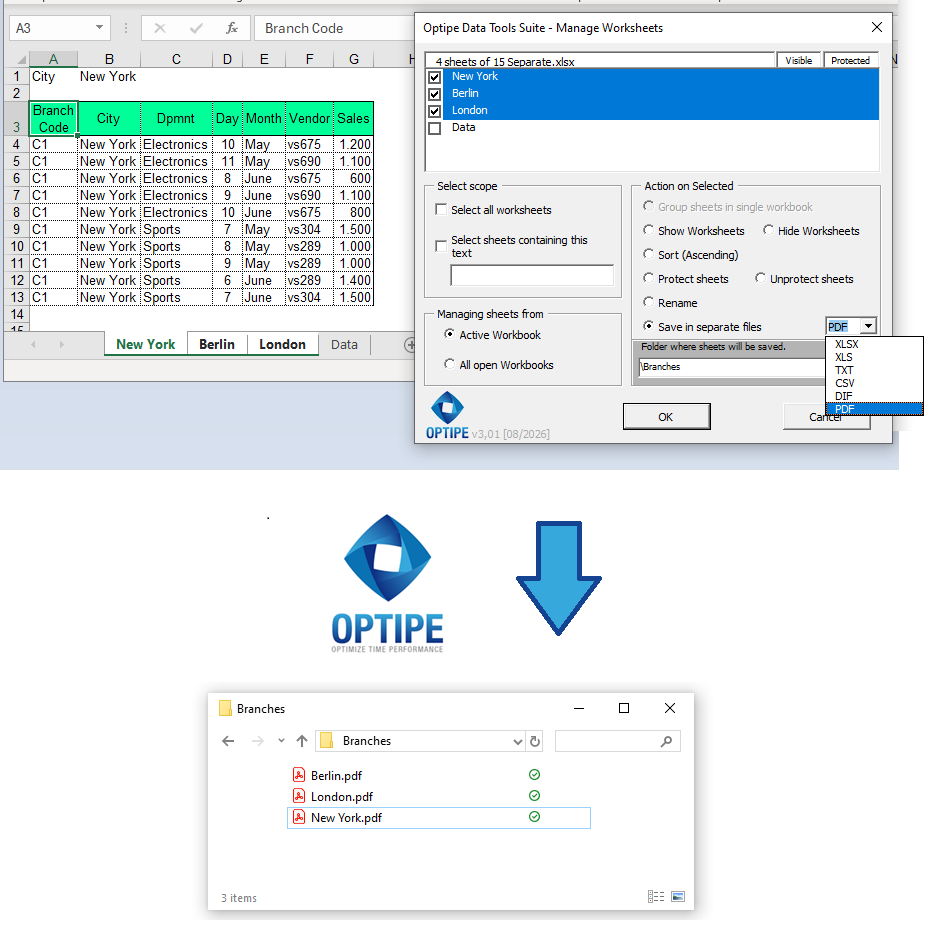
Each worksheet can be automatically converted into an independent PDF document.
💡 Result
All worksheets become individual PDF documents ready for distribution, printing and long-term archiving.
🚀 Much more than exporting worksheets to PDF
Manage Worksheets does much more than create PDF files. It automates document generation, prepares reports for distribution and simplifies business reporting workflows.
- ✔ Generate one PDF document for every worksheet automatically.
- ✔ Create dozens or hundreds of PDF files in seconds.
- ✔ Preserve formatting and worksheet layout.
- ✔ Prepare documents for printing, sharing and archiving.
- ✔ Reduce repetitive document generation tasks.
- ✔ Automate recurring reporting processes.
Learn More About Manage Worksheets →
🎥 Video: Export Multiple Excel Worksheets to PDF
Learn how to automatically create a separate PDF document for every worksheet inside a workbook.
Save worksheets as individual files:
📧 Tip: Email generated PDF files automatically
💡 Next Step: Once individual PDF documents have been generated for each branch office, customer, department or salesperson, you can automatically distribute them using Optipe MultiMail, eliminating repetitive email preparation and attachment management.
👉 Send Documents and Files from Excel with Outlook | Optipe MultiMail
📌 Practical Business Scenarios
📊 Financial Reporting
Generate individual PDF reports for branch offices, departments or business units automatically.
🏢 Branch Office Reports
Create separate PDF documents for New York, Berlin and London without manual intervention.
🎓 Certificates and Statements
Prepare customer, employee or student documents ready for printing or delivery.
📑 Compliance and Audits
Archive reports and supporting documentation in a non-editable format.
💡 Why PDF Remains the Preferred Business Format
PDF files remain the preferred format for business communication because they preserve document appearance and reduce the risk of accidental changes.
- Consistent appearance: documents look the same on every device.
- Reduced editing risk: recipients cannot easily modify formulas or data.
- Professional distribution: ideal for customers, suppliers and executives.
- Long-term archiving: suitable for audit trails and compliance requirements.
- Universal compatibility: can be opened on almost any computer or mobile device.
⏱ Comparison: Manual Export vs. Manage Worksheets
| Manual Export | Manage Worksheets |
|---|---|
| Export every worksheet separately. | Generate all PDFs automatically. |
| Repeat the same process multiple times. | One operation for all worksheets. |
| Risk forgetting worksheets. | Consistent document generation. |
| Time-consuming for large workbooks. | Designed for high-volume reporting. |
| Higher administrative workload. | Fast and repeatable process. |
❓ Frequently Asked Questions
Can I create a PDF file for every worksheet?
Yes. Every selected worksheet can be exported automatically as an individual PDF document.
Will Excel formatting be preserved?
Yes. The exported PDFs preserve worksheet layout and formatting.
Can I use this for customer or branch office reporting?
Absolutely. Report distribution is one of the most common business scenarios.
Does it work with large workbooks?
Yes. The application is designed to process large numbers of worksheets efficiently.
Can the generated PDF files be emailed automatically?
Yes. They can be distributed using Optipe MultiMail.
Do my data leave my computer?
No. All processing takes place locally.
📚 Related Articles
- Manage Excel Worksheets in Seconds: App Data Tools Suite
- How to Consolidate Multiple Excel Worksheets into a Single Table
- How to Split an Excel Table into Multiple Worksheets Automatically
- How to Create an Excel File for Each Customer, Branch Office or Department
- How to Create a Master Excel Workbook from Multiple Files
- How to Manage Multiple Excel Worksheets in Seconds
Automate your Excel work and save hours every week
Data Tools Suite includes 18 applications to automate data management, tables and worksheets in Excel.
MultiMail lets you send personalized emails, documents and reports directly from Excel.
TRY IT. YOU'LL GET IT.
🚀 Download Freemium Version